Getting started
Core resources
Other
Verify with SEEK Pass
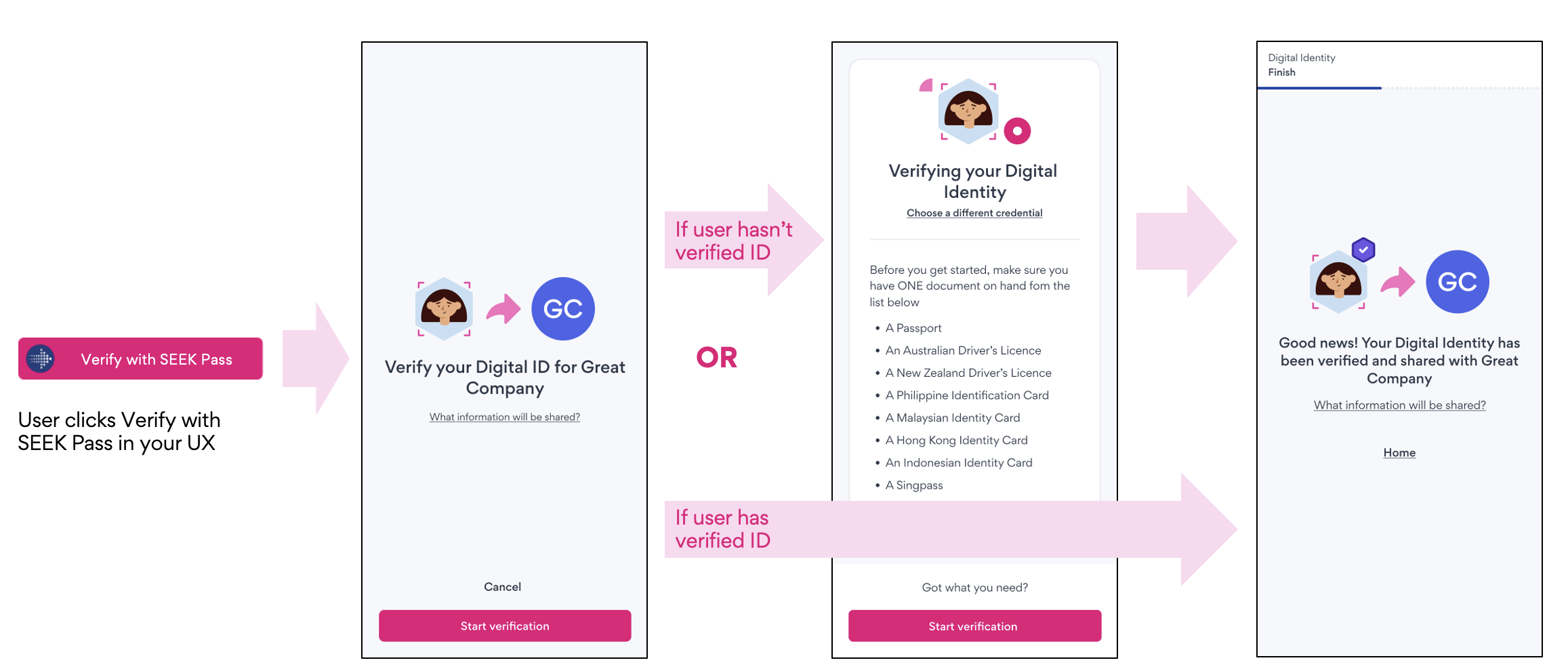
Verify with SEEK Pass provides a seamless way for verifying credentials (e.g. digital identity) via SEEK Pass. For this integration, partners embed a button in their application flow which directs users to the SEEK Pass app where they need to choose a credential to be verified (e.g. passport, driver's licence). Partners can integrate with SEEK Pass using REST APIs to authenticate and create a verification request, and redirect users to the SEEK Pass app.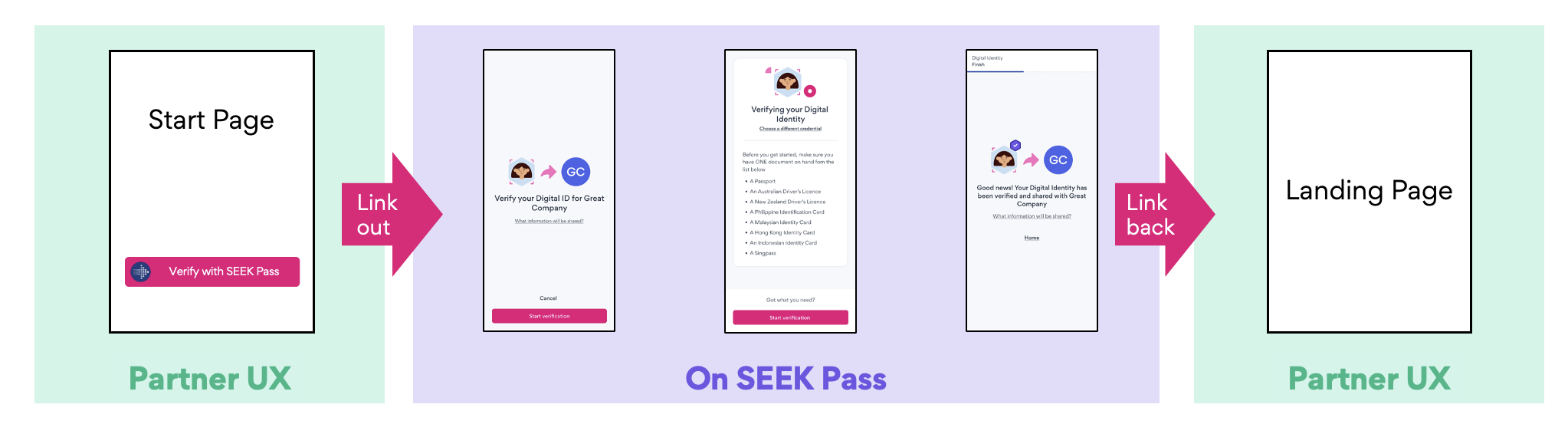
Technical details
There are 3 phases for this integration:- Authenticating with SEEK Pass
- Submitting a verification request
- Retrieving verification result
# POST /api/partner/v2/oauth/token

curl --location $SEEK_PASS_URL/api/partner/v2/oauth/token.json
--header 'Accept: application/json'
--header 'Content-Type: application/x-www-form-urlencoded'
--data-urlencode grant_type=client_credentials
--data-urlencode client_id=$CLIENT_ID
--data-urlencode client_secret=$CLIENT_SECRET
--data-urlencode 'scope=write.digital_identity read.digital_identity'Request payload
The request payload contains the following fields:- request_id (optional): It’s for partners to track their requests. If not provided, it will be auto-generated.
- callback_url (optional): Users will be redirected back to this URL, if provided, after completing the flow.
- display_options (required): The partner_name value which is mandatory, will be shown to users. partner_logo_url can also be provided.
- request_source (optional): This field records any existing hirerachy of parties involved in the verification request (e.g. ATSs).
- metadata (optional): This field captures any extra information that SEEK Pass needs for reporting or other purposes. For SEEK/Indirect, we’ll record job-related information.
- options (optional): Optional parameters to configure the SEEK Pass experience.
- email_hint (optional): Pre-fills the user's email address on the login screen. The user is able to enter a different email address if they wish.
- locale (optional): Sets the initial language for the verification flow.
If a request_id is not provided in the request payload, SEEK Pass will auto-generate a unique request ID. We recommend using a globally unique value (e.g. UUID) for request_id to ensure proper tracking of user requests.
# POST /api/partner/v2/verify/requests/digital_identity.json

{
  "request_id": "7cbc7e51-82f5-43ec-8d63-b7cdf1170425",  // Optional. For tracking requests. If not passed, it will be auto-generated.
  "callback_url": "https://www.partner.com/callback",    // Optional. For redirecting users
  "display_options": {           // Required
    "partner_name": "string",    // Required
    "partner_logo_url": "string" // Optional
  },
  "request_source": [            // Optional
    {
      "name": "string"
    }
  ],
  "metadata": {                  // Optional - context about the verification
    "position_title": "string",
    "position_url": "string",
    "position_location": "string",
    "job_categories": "string",
    "applied_on_seek": true
  },
  "options": {                   // Optional - configure the SEEK Pass experience
    "email_hint": "string",      // Optional. Pre-fills the user's email address
    "locale": "string"           // Optional. Sets the language for the verification flow (e.g. en-AU)
  }
}{
"request_id": "7cbc7e51-82f5-43ec-8d63-b7cdf1170425",
"redirect_uri": "https://app.seekpass.co/partner/verify/digitalIdentity?clientId=[CLIENT_ID]&requestId=fa651300-b91a-49cb-8ee7-cac68b3fdf74"
}Behaviour
- User Association: When a user accesses the
redirect_uriand authenticates, the request becomes associated with their account. - Unassociated Request Expiry: If the user fails to access the
redirect_uriand begin their submission within 30 days, the request will be automatically cancelled and the original data will be permanently deleted. - Reusing Request ID: Once a request is completed or cancelled, you may reuse the same
request_idto create a new request. - In-Progress Submission Behavior: If the user has started a submission but not completed it, and accesses the same
redirect_uri, the user will be directed to the in-progress submission to continue. - Post-Submission Behavior: Once submission is completed and the user accesses the same
redirect_uri, the user will be directed to the submitted credential.
Once a user clicks the link and logs into the system, the data is associated only with them. If another user attempts to use the same link, they will be redirected to an error page.
Sequence diagram
SEEK Pass account
SEEK Pass will provide OAuth credentials for partners for authentication in staging and production environments:- OAuth token endpoint: POST /api/partner/v2/oauth/token.json
- Host:
- Production: https://app.seekpass.co
- Staging: https://app.seekpass-staging.com
- Client credentials will be provided via a secure channel (e.g. 1Password)
Verify with SEEK Pass button
SEEK Pass provides our partners with a selection of branded button assets and QR code design guidance that can be embedded to be displayed on your platform. These images will be rendered with SEEK Pass branding, ensuring consistency across user interactions. We recommend following the provided assets and guidance wherever possible to ensure a consistent, on-brand experience.We recommend using the QR code for experiences on shared devices, and the button for experiences accessed on a user’s personal device.A sample button is shown below. For more details, please refer to our API documentation - Branding Guidelines.
Redirect URI structure
- Path: /partner/verify/[Credential type]
- Host:
- Production: https://app.seekpass.co
- Staging: https://app.seekpass-staging.com
- Query: The below parameters as URL query parameters
- clientId: OAuth Application ID
- requestId: Verification request ID
- Sample: https://app.seekpass-staging.com/partner/verify/digitalIdentity?clientId=[CLIENT_ID]&requestId=fa651300-b91a-49cb-8ee7-cac68b3fdf74