เริ่มต้นใช้งาน
ข้อมูลหลัก
อื่นๆ
ยืนยันด้วย SEEK Pass
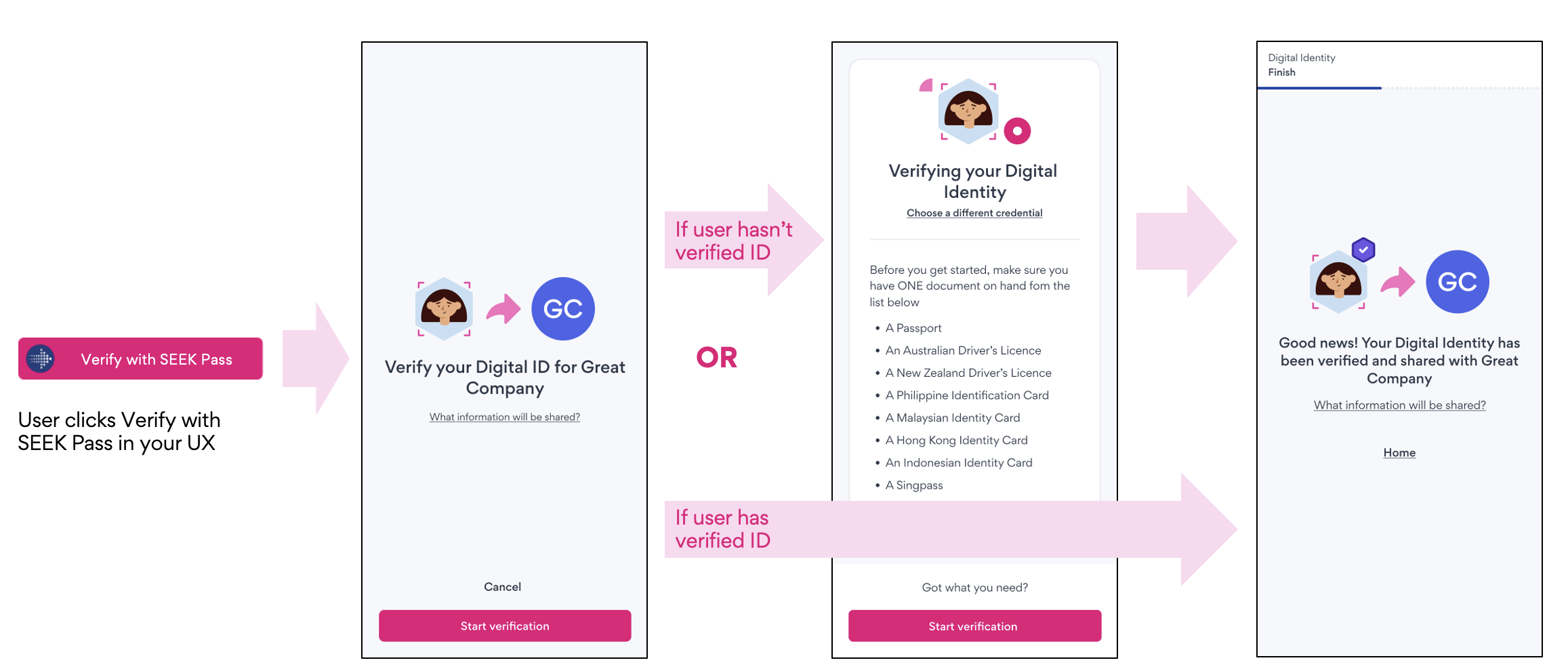
ยืนยันด้วย SEEK Pass มอบวิธีที่ราบรื่นสำหรับการยืนยันข้อมูลรับรอง (เช่น ตัวตนดิจิทัล) ผ่าน SEEK Pass สำหรับการผสานรวมนี้ พันธมิตรจะฝังปุ่มไว้ในขั้นตอนการใช้งานของตน ซึ่งจะนำผู้ใช้ไปยังแอป SEEK Pass ที่ผู้ใช้ต้องเลือกข้อมูลรับรองที่จะยืนยัน (เช่น หนังสือเดินทาง ใบขับขี่) พันธมิตรสามารถผสานรวมกับ SEEK Pass โดยใช้ REST APIs เพื่อตรวจสอบสิทธิ์และสร้างคำขอการยืนยัน และเปลี่ยนเส้นทางผู้ใช้ไปยังแอป SEEK Pass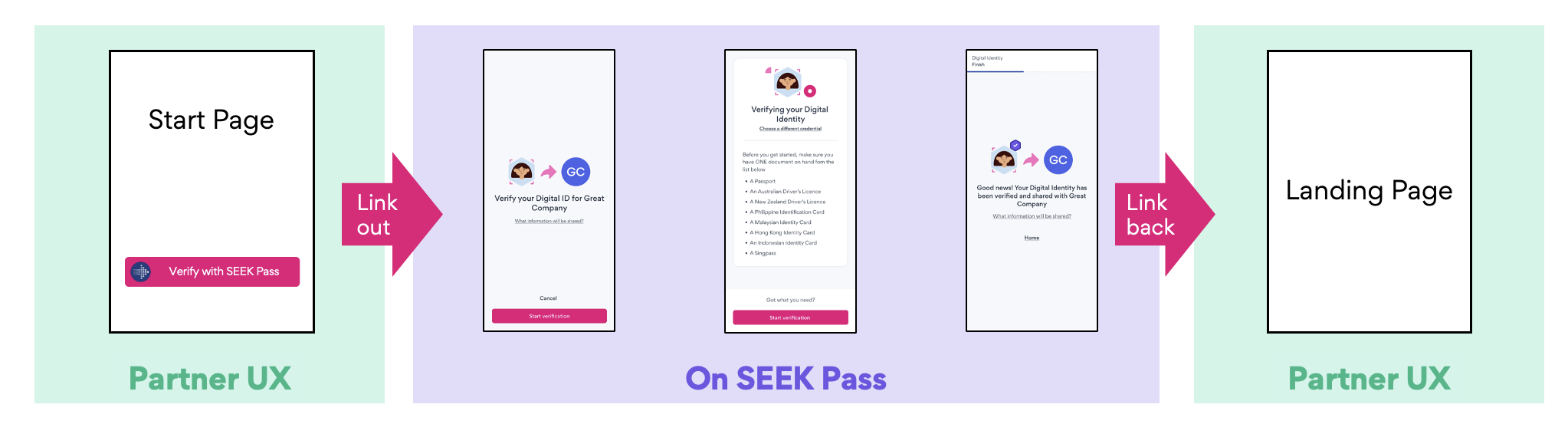
รายละเอียดทางเทคนิค
การเชื่อมต่อนี้มี 3 ระยะ:- การยืนยันตัวตนกับ SEEK Pass
- การส่งคำขอการยืนยัน
- กำลังดึงผลการยืนยัน
# POST /api/partner/v2/oauth/token

curl --location $SEEK_PASS_URL/api/partner/v2/oauth/token.json
--header 'Accept: application/json'
--header 'Content-Type: application/x-www-form-urlencoded'
--data-urlencode grant_type=client_credentials
--data-urlencode client_id=$CLIENT_ID
--data-urlencode client_secret=$CLIENT_SECRET
--data-urlencode 'scope=write.digital_identity read.digital_identity'เพย์โหลดคำขอ
เพย์โหลดคำขอมีฟิลด์ดังนี้:- request_id (ไม่บังคับ): ใช้ให้พาร์ทเนอร์ติดตามคำขอของตน หากไม่ระบุ ระบบจะสร้างให้อัตโนมัติ
- callback_url (ไม่บังคับ): หากระบุ ผู้ใช้จะถูกส่งกลับไปยัง URL นี้หลังทำขั้นตอนการยืนยันตัวตนให้เสร็จสิ้น
- display_options (required): ค่า partner_name ที่จำเป็นต้องระบุจะแสดงให้ผู้ใช้เห็น สามารถระบุ partner_logo_url เพิ่มเติมได้
- request_source (ไม่บังคับ): ฟิลด์นี้บันทึกลำดับชั้นของฝ่ายที่เกี่ยวข้องในคำขอการยืนยันตัวตน (เช่น ATS)
- metadata (ไม่บังคับ): ฟิลด์นี้เก็บข้อมูลเพิ่มเติมที่ SEEK Pass ต้องการเพื่อการรายงานหรือวัตถุประสงค์อื่น สำหรับ SEEK/Indirect เราจะบันทึกข้อมูลที่เกี่ยวข้องกับงาน
- options (ไม่บังคับ): พารามิเตอร์ที่ไม่บังคับสำหรับกำหนดค่าประสบการณ์การใช้งาน SEEK Pass
- email_hint (ไม่บังคับ): กรอกที่อยู่อีเมลของผู้ใช้ไว้ล่วงหน้าบนหน้าจอเข้าสู่ระบบ ผู้ใช้สามารถป้อนที่อยู่อีเมลอื่นได้หากต้องการ
- locale (ไม่บังคับ): กำหนดภาษาเริ่มต้นสำหรับขั้นตอนการยืนยัน
หากไม่มี request_id ในเพย์โหลดคำขอ SEEK Pass จะสร้าง request ID ที่ไม่ซ้ำให้อัตโนมัติ เราแนะนำให้ใช้ค่าที่ไม่ซ้ำทั่วโลก (เช่น UUID) สำหรับ request_id เพื่อให้ติดตามคำขอของผู้ใช้ได้อย่างถูกต้อง
# POST /api/partner/v2/verify/requests/digital_identity.json

{
  "request_id": "7cbc7e51-82f5-43ec-8d63-b7cdf1170425",  // Optional. For tracking requests. If not passed, it will be auto-generated.
  "callback_url": "https://www.partner.com/callback",    // Optional. For redirecting users
  "display_options": {           // Required
    "partner_name": "string",    // Required
    "partner_logo_url": "string" // Optional
  },
  "request_source": [            // Optional
    {
      "name": "string"
    }
  ],
  "metadata": {                  // Optional - context about the verification
    "position_title": "string",
    "position_url": "string",
    "position_location": "string",
    "job_categories": "string",
    "applied_on_seek": true
  },
  "options": {                   // Optional - configure the SEEK Pass experience
    "email_hint": "string",      // Optional. Pre-fills the user's email address
    "locale": "string"           // Optional. Sets the language for the verification flow (e.g. en-AU)
  }
}{
"request_id": "7cbc7e51-82f5-43ec-8d63-b7cdf1170425",
"redirect_uri": "https://app.seekpass.co/partner/verify/digitalIdentity?clientId=[CLIENT_ID]&requestId=fa651300-b91a-49cb-8ee7-cac68b3fdf74"
}พฤติกรรม
- การเชื่อมโยงผู้ใช้: เมื่อผู้ใช้เข้าถึง
redirect_uriและยืนยันตัวตน คำขอจะถูกเชื่อมโยงกับบัญชีของตน - การหมดอายุของคำขอที่ไม่ได้เชื่อมโยง: หากผู้ใช้ไม่ได้เข้าถึง
redirect_uriและเริ่มการส่งข้อมูลภายใน 30 วัน คำขอจะถูกยกเลิกโดยอัตโนมัติและข้อมูลเดิมจะถูกลบอย่างถาวร - การใช้รหัสคำขอซ้ำ: เมื่อคำขอเสร็จสมบูรณ์หรือถูกยกเลิก คุณสามารถใช้
request_idเดิมซ้ำได้เพื่อสร้างคำขอใหม่ - การทำงานของการส่งข้อมูลที่อยู่ระหว่างดำเนินการ: หากผู้ใช้เริ่มการส่งข้อมูลแล้วแต่ยังดำเนินการไม่เสร็จสิ้น และเข้าถึง
redirect_uriเดิม ผู้ใช้จะถูกนำไปยังการส่งข้อมูลที่อยู่ระหว่างดำเนินการเพื่อดำเนินการต่อ - การทำงานหลังจากการส่งข้อมูล: เมื่อการส่งข้อมูลเสร็จสิ้นและผู้ใช้เข้าถึง
redirect_uriเดิม ผู้ใช้จะถูกนำไปยังข้อมูลรับรองที่ส่งไปแล้ว
เมื่อผู้ใช้คลิกลิงก์และเข้าสู่ระบบแล้ว ข้อมูลจะถูกเชื่อมโยงเฉพาะกับผู้ใช้นั้นเท่านั้น หากผู้ใช้อื่นพยายามใช้ลิงก์เดียวกัน ระบบจะนำไปยังหน้าแสดงข้อผิดพลาด
แผนภาพลำดับ
บัญชี SEEK Pass
SEEK Pass จะให้ข้อมูลรับรอง OAuth สำหรับพาร์ทเนอร์เพื่อใช้ยืนยันตัวตนในสภาพแวดล้อม staging และ production ดังนี้:- ปลายทาง OAuth token: POST /api/partner/v2/oauth/token.json
- โฮสต์:
- Production: https://app.seekpass.co
- Staging: https://app.seekpass-staging.com
- ข้อมูลรับรองของไคลเอนต์จะถูกส่งให้ผ่านช่องทางที่ปลอดภัย (เช่น 1Password)
ปุ่ม ยืนยันด้วย SEEK Pass
SEEK Pass เตรียมองค์ประกอบปุ่มของแบรนด์และคำแนะนำในการออกแบบ QR code ให้พาร์ทเนอร์ของเราเลือกใช้ ซึ่งสามารถฝังเพื่อแสดงบนแพลตฟอร์มของคุณได้ รูปภาพเหล่านี้จะแสดงผลพร้อมแบรนด์ SEEK Pass เพื่อให้แน่ใจว่าการโต้ตอบของผู้ใช้มีความสอดคล้องกัน เราขอแนะนำให้ใช้องค์ประกอบและคำแนะนำที่ให้ไว้ในทุกที่ที่เป็นไปได้ เพื่อให้แน่ใจว่าจะได้รับประสบการณ์ที่สอดคล้องและตรงตามแบรนด์เราขอแนะนำให้ใช้ QR code สำหรับการใช้งานบนอุปกรณ์ที่ใช้ร่วมกัน และใช้ปุ่มสำหรับการใช้งานที่เข้าถึงผ่านอุปกรณ์ส่วนตัวของผู้ใช้ตัวอย่างปุ่มแสดงอยู่ด้านล่าง สำหรับรายละเอียดเพิ่มเติม กรุณาอ้างอิงจากเอกสารประกอบ API - แนวทางปฏิบัติด้านแบรนด์ของเรา
โครงสร้าง Redirect URI
- พาธ: /partner/verify/[Credential type]
- โฮสต์:
- Production: https://app.seekpass.co
- Staging: https://app.seekpass-staging.com
- คิวรี: พารามิเตอร์ด้านล่างเป็นพารามิเตอร์คิวรีของ URL
- clientId: ID แอปพลิเคชัน OAuth
- requestId: ID คำขอการยืนยัน
- ตัวอย่าง: https://app.seekpass-staging.com/partner/verify/digitalIdentity?clientId=[CLIENT_ID]&requestId=fa651300-b91a-49cb-8ee7-cac68b3fdf74